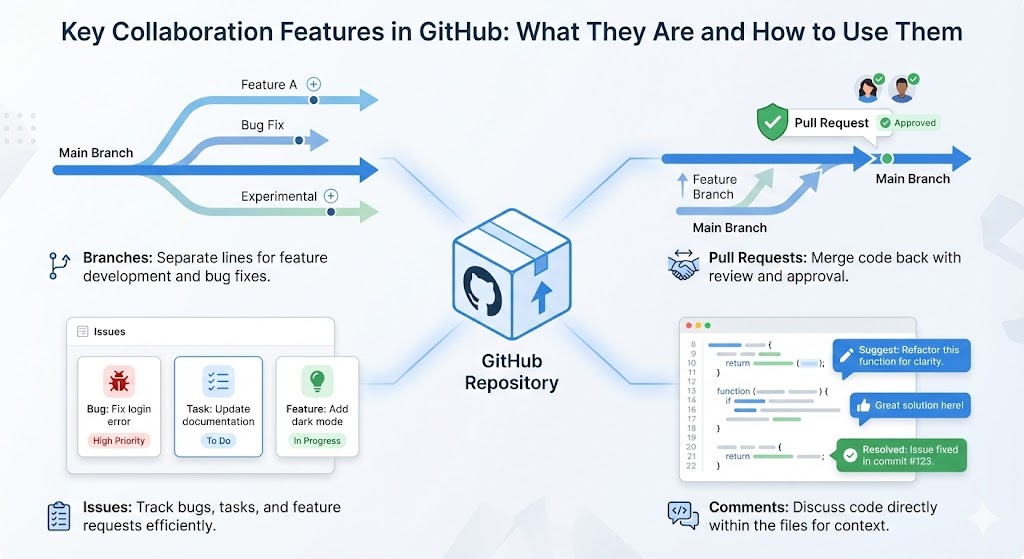
Collaboration is one of the biggest reasons developers use GitHub. Whether you are working alone or with a large team, GitHub provides powerful features that make teamwork smooth, organized, and error-free.
In this article, we’ll clearly explain what each key collaboration feature is and how to use it, using simple language and practical steps.
1. Branches – Work on New Features Separately
What Are Branches?
A branch is a separate copy of your code where you can work without affecting the main version. The main branch (often called main) always stays stable, while branches are used for new features or fixes.
Branches allow multiple people to work at the same time without interfering with each other’s work.
Why Branches Are Important
- Keeps the main code safe
- Allows parallel work
- Makes testing easier
- Reduces chances of breaking the project
How To Use Branches
- Create a new branch from the main branch
- Switch to that branch
- Make your changes
- Save and commit your work
Once the feature is complete, the branch can be merged back into the main branch.
2. Pull Requests – Request to Merge Changes
What Is a Pull Request?
A pull request (PR) is a request to merge your branch into another branch, usually the main branch. It is also a place where team members review and discuss code changes.
Pull requests are the heart of collaboration in GitHub.
Why Pull Requests Matter
- Enables code review
- Improves code quality
- Prevents mistakes
- Encourages team discussion
How To Create a Pull Request
- Push your branch to GitHub
- Click New Pull Request
- Select your branch and the main branch
- Add a clear description
- Submit the pull request
Team members can review, comment, and approve before merging.
3. Issues – Track Bugs and Tasks
What Are Issues?
Issues are used to track bugs, feature requests, tasks, or improvements. Think of issues as a shared to-do list for your project.
They help teams stay organized and focused.
Why Issues Are Useful
- Keeps work visible
- Assigns responsibility
- Tracks progress
- Improves planning
How To Create and Use Issues
- Go to the Issues tab in your repository
- Click New Issue
- Add a title and description
- Assign it to a team member
- Add labels like “bug” or “feature”
Issues can also be linked to pull requests for better tracking.
4. Comments – Discuss Changes Directly on Code
What Are Comments?
Comments allow developers to discuss code directly inside pull requests, commits, or issues. Instead of long emails, discussions happen right where the code lives.
Why Comments Improve Collaboration
- Clear communication
- Faster feedback
- Better understanding
- Fewer misunderstandings
How To Use Comments Effectively
- Open a pull request or commit
- Click on a specific line of code
- Add your comment or suggestion
- Mention teammates if needed
Comments keep discussions focused and relevant.
Conclusion
GitHub’s collaboration features—branches, pull requests, issues, and comments—work together to create a smooth and reliable workflow. Branches keep work separate, pull requests ensure quality, issues organize tasks, and comments keep communication clear.
When used properly, these tools make teamwork easier, faster, and more enjoyable, even for beginners. If you’re new to GitHub, start by mastering these features one by one, and you’ll quickly see how powerful collaboration can be.

Leave a comment