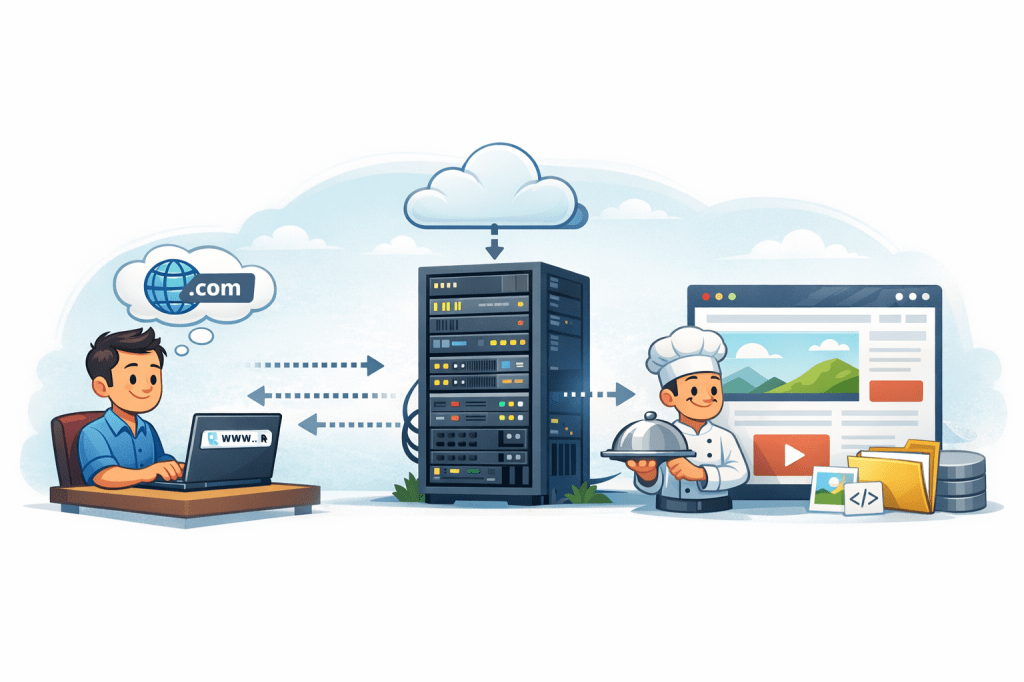
Every time you open a website, something surprisingly complex happens in just a few seconds. Your browser talks to a website, the website talks back, and a server quietly does most of the heavy lifting in the background.
If terms like server, request, or response feel confusing, don’t worry. This article explains everything from scratch, in plain language, with no technical background required.
The Big Picture (Before Details)
Think of visiting a website like ordering food at a restaurant:
- You → the customer
- Your browser → the waiter
- The server → the kitchen
- The website → the meal you receive
You ask for something, the kitchen prepares it, and the waiter brings it back to you.
That’s the core idea.
Let’s break it down step by step.
What Is a Browser?
A browser is the app you use to access the internet.
Examples include Chrome, Safari, Firefox, and Edge.
Your browser’s main jobs are to:
- Send requests for websites
- Receive responses from servers
- Turn code into a visual page you can read and interact with
When you type a website address (like example.com) and press Enter, your browser doesn’t magically “open a page.” It asks for it.
What Is a Server (in This Context)?
A server is just a computer.
But it’s a special kind of computer that:
- Is always turned on
- Is connected to the internet 24/7
- Stores website files (text, images, videos, databases)
- Responds when someone asks for those files
In simple terms:
A server is a computer whose job is to serve websites to browsers.
Your laptop could be a server, but servers are usually powerful machines sitting in data centers around the world.
What Is a Website Then?
A website is not the server itself.
A website is a collection of files and instructions, such as:
- HTML (structure of the page)
- CSS (design and layout)
- JavaScript (interactivity)
- Images, videos, and text
- Sometimes data from a database
All of this lives on the server.
How Communication Actually Happens (Step by Step)
Here’s the exact flow when you visit a website:
Step 1: You Enter a Website Address
You type example.com into your browser and press Enter.
This tells your browser:
“Go get the website files for this address.”
Step 2: The Browser Finds the Server
Your browser needs to figure out which server holds that website.
Behind the scenes, it:
- Looks up the website’s address
- Finds the server’s IP address (its internet location)
You don’t see this step, but it happens every time.
Step 3: The Browser Sends a Request
Once the server is found, your browser sends a message called a request.
That request basically says:
“Hi server, please send me the homepage of this website.”
Step 4: The Server Processes the Request
The server receives the request and decides what to do.
Depending on the website, it may:
- Fetch files (HTML, CSS, images)
- Run some code
- Pull data from a database
- Check permissions or login status
Then it prepares a response.
Step 5: The Server Sends a Response
The server sends back a response that includes:
- Website code
- Content
- Images
- Instructions for how things should behave
This is not a “page” yet—just raw materials.
Step 6: The Browser Builds the Page
Your browser takes everything it receives and:
- Reads the HTML to understand structure
- Applies CSS for design
- Runs JavaScript for buttons, forms, animations
- Displays the final page on your screen
This entire process usually takes milliseconds.
Why Servers Matter So Much
Without servers:
- Websites wouldn’t exist
- Online stores couldn’t process orders
- Emails, videos, and social media wouldn’t work
Servers are responsible for:
- Speed
- Reliability
- Security
- Storing data
That’s why companies invest heavily in good servers and hosting.
Client vs Server (One Key Concept)
In web communication, there are two roles:
- Client → your browser (the one asking)
- Server → the computer responding
Your browser never “pushes” content onto the server.
It always requests, and the server responds.
This clear separation keeps the web organized and secure.
What This Means for You
Understanding this communication helps you:
- Build websites more confidently
- Troubleshoot loading issues
- Understand hosting, domains, and performance
- Make better decisions in online business and tech
Once you grasp that a website is just files on a server responding to browser requests, the internet suddenly feels much less mysterious.
If you’re interested in learning how this knowledge connects to online income, digital skills, and personal growth, you may find my books on business, communication, and self-development helpful on Apple Books by Shafaat Ali.

Leave a comment