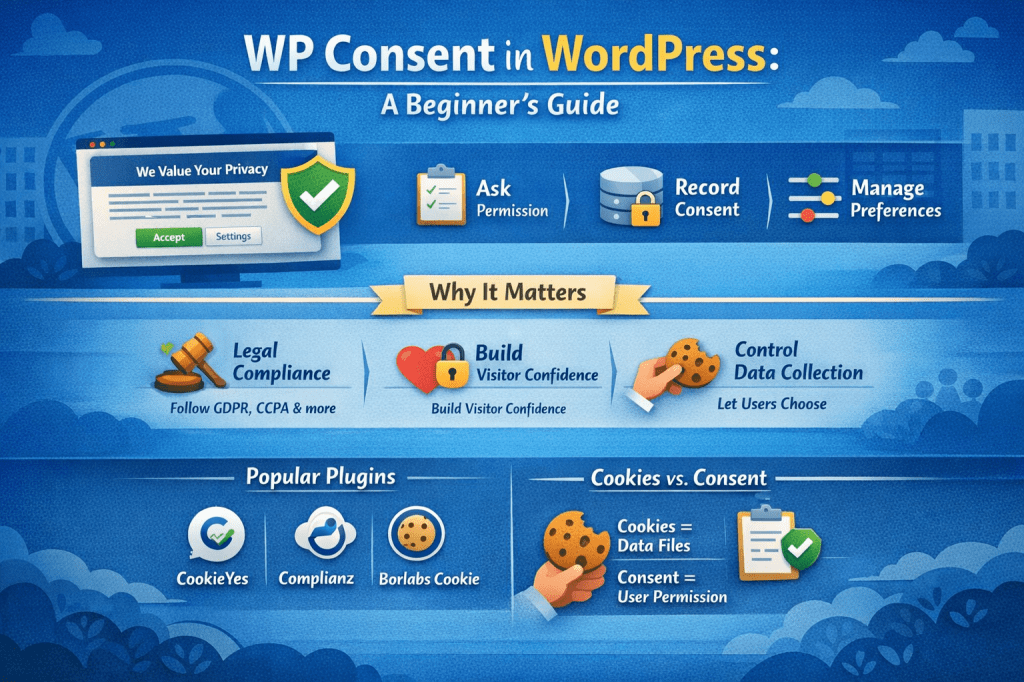
If you run a WordPress website, you’ve probably seen (or used) those cookie pop-ups that ask visitors to accept or manage their preferences. That entire system is often referred to as WP Consent.
But what does WP Consent actually mean in WordPress, and why is it so important?
Let’s break it down in simple terms—no legal jargon, no confusion.
Understanding WP Consent in Simple Words
WP Consent in WordPress refers to the process of asking, recording, and managing user permission before collecting personal data through cookies, tracking scripts, or third-party tools.
In short:
WP Consent helps your WordPress site respect user privacy and follow data protection laws.
It’s usually handled through plugins that display cookie consent banners, preference pop-ups, or privacy notices.
Why WP Consent Matters
WP Consent isn’t just a “nice-to-have” feature. It’s essential for both legal compliance and user trust.
1. Legal Compliance
Many privacy laws require websites to get user consent before tracking data:
- GDPR (European Union)
- CCPA / CPRA (California)
- ePrivacy Directive
- LGPD (Brazil)
If your site uses analytics, ads, or embedded tools, you must ask permission first.
2. User Trust & Transparency
When visitors see a clear consent notice, they feel safer using your site. It shows that you care about privacy and transparency.
3. Control Over Data Collection
WP Consent allows users to:
- Accept all cookies
- Reject non-essential cookies
- Customize their preferences
This puts control back in the hands of the visitor.
What Kind of Consent Does WordPress Need?
WordPress itself doesn’t collect personal data by default, but plugins and themes often do.
Here are common areas where consent is required:
- Analytics (Google Analytics, Meta Pixel)
- Advertising cookies
- Embedded content (YouTube, Google Maps)
- Email marketing tools
- Chat widgets
- Tracking scripts
WP Consent ensures these tools only load after permission is given.
How WP Consent Works in WordPress
Here’s how the consent process usually works behind the scenes:
- A visitor lands on your website
- A consent banner or popup appears
- The user chooses:
- Accept
- Reject
- Customize preferences
- The plugin records the choice
- Cookies and scripts load (or stay blocked) based on that choice
All of this happens automatically once the system is set up.
WP Consent vs Cookies (What’s the Difference?)
This is a common confusion.
- Cookies are small files stored in the browser
- Consent is the user’s permission to use those cookies
WP Consent doesn’t create cookies—it controls whether cookies are allowed at all.
Think of it like this:
Cookies are the tools, consent is the permission slip.
Popular WP Consent Plugins in WordPress
WordPress doesn’t include built-in consent management, so plugins handle it.
Some widely used options include:
- CookieYes
- Complianz
- Cookiebot
- GDPR Cookie Consent
- Borlabs Cookie
These plugins:
- Display consent banners
- Block scripts before consent
- Store user preferences
- Help with legal compliance
Most offer both free and premium versions depending on your needs.
Is WP Consent Mandatory for All WordPress Sites?
Not always—but in most cases, yes.
You likely need WP Consent if your site:
- Has visitors from the EU or California
- Uses analytics or tracking tools
- Displays ads
- Embeds third-party content
If your site is purely informational with no tracking at all, consent may not be required—but that’s rare.
WP Consent and WordPress Core
WordPress has made progress in privacy features, like:
- Privacy Policy page generator
- Personal data export and erasure tools
However, WordPress core does not handle cookie consent.
That’s why WP Consent plugins are essential for modern WordPress sites built on WordPress.
Common Mistakes to Avoid
Many site owners install a consent plugin but still get things wrong.
Avoid these mistakes:
- Loading analytics before consent
- Using “Accept only” buttons with no reject option
- Hiding consent settings
- Assuming one-time setup is enough
- Ignoring updates to privacy laws
Proper WP Consent is about ongoing responsibility, not just installation.
What This Means for You
If you run a WordPress website, WP Consent is not something to ignore.
It helps you:
- Stay compliant with privacy laws
- Build trust with visitors
- Avoid potential penalties
- Run a more professional website
Setting it up correctly takes a little time—but it protects both you and your users.
If you’re interested in improving your online business knowledge, communication skills, or personal growth strategies, you may also find value in exploring my books on Apple Books, especially those focused on business, relationships, and personal development.

Leave a comment